
Your memory, not your AI's.
BeforeYour context lives inside one AI, and you pay to keep it there.
AfterYour knowledge lives in plain files on your computer. It goes wherever you go.
Stop re-explaining your work to AI.
One place for everything you know. Any AI can read it. It's yours for life.
The AI puts each item in the right place, and you can see and change every move it makes. Trust it, and check it.
See what is insideBeforeYour context lives inside one AI, and you pay to keep it there.
AfterYour knowledge lives in plain files on your computer. It goes wherever you go.
BeforeEvery new chat starts with you explaining your work again.
AfterYour structure, rules and processes are written down once. Any AI follows them.
BeforeMeetings, emails and projects sit in different apps, and things slip.
AfterThe AI puts each item in the right place. You see every move, and you can change it.
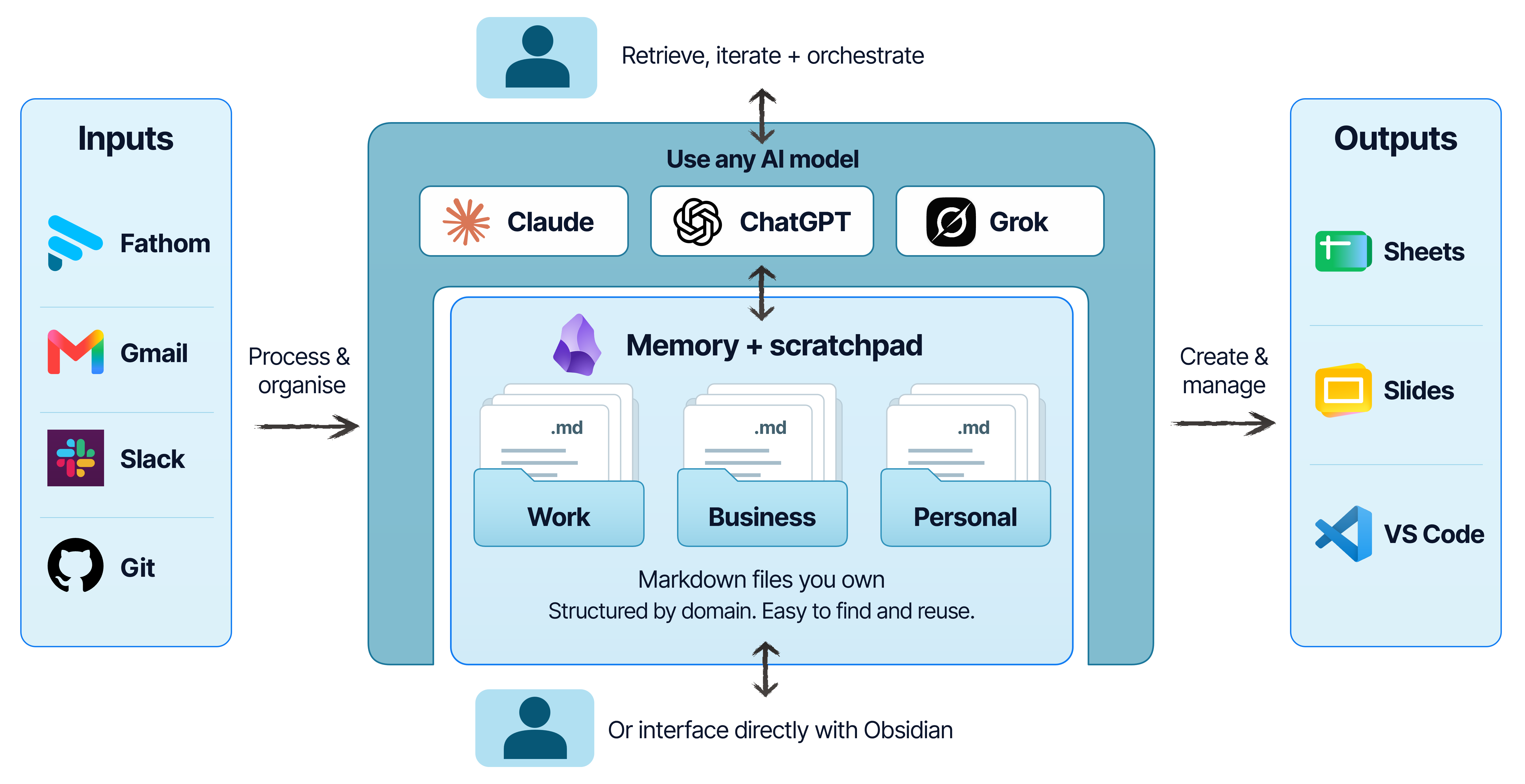
This diagram shows my own setup. The kit includes examples for local Markdown import and migration. You can add live connections separately.
View full-size graphic (opens in a new tab)How it works
A small Markdown foundation brings knowledge, instructions and repeatable work together. Explore a clear structure, then shape it around your own notes and ways of working.
Keep short- and long-term knowledge in Markdown, organised by Domain. Optional character and voice guides are part of that context: lightweight roles using the same knowledge, without separate bots or a character for every Domain.
Domains, routing + optional character/voice guides included
Connections are pipelines: environment configuration and Python scripts that import material. Start with one deliberate local import. Add live services only after their access and behaviour are understood.
Local Markdown importer included; live connectors excluded
Save a short learning note, close actions only when evidence supports it, reformat Markdown, orient from sources and leave a useful handoff. Read, edit or extend the skill files yourself.
Editable skills + choose/use/edit/create guidance
One small working loop
Ask your assistant to read the project source, show the evidence and suggest one next step. When you finish, request a handoff that records what changed and what is still open.
Project decisions stay in your vault. Build instructions and engineering history stay in their repositories, linked from the project.
Fictional example / project.md
Own your knowledge. Plug in any AI.
USD. Launch price for the first 50 sales, then $49.
One-time purchase. No subscription. The files are yours to keep.
Live service connectors and automated routines are not included.
Buy the Starter Kit, $29Secure checkout through Lemon Squeezy.
Open checkout in a new tab (opens in a new tab)Start with separate Work and Personal domains, journal templates and rules that show your assistant where to put notes, decisions and tasks.
Review a project, process meeting notes, capture what you learn or leave a handoff. Read and change each procedure in Markdown.
Start a new vault or use one you already have. Try the ready-made prompts and fictional walkthroughs. The privacy guide explains what your AI provider can see.
Use the examples to import a local Markdown file or copy a reviewed set of notes into the vault.
Bring your own AI assistant. The kit has no live app connections, hosted storage, bundled plugins or scheduled background tasks.
Answer ten quick questions to see how the kit could fit your work. No email required.
Question 1 of 10
Your needs and preferences
Choose one.
Your answers stay here while you go back and make changes.